
SEO for Ecommerce: How to Get Your Products Found on Google and Bing
SEO for ecommerce means making your product and category pages easy for Google and Bing to find, understand and show, so shoppers land on your store from free search results instead of paid ads. It comes down to the right keywords, well-built category and product pages, product data Google can read, and a fast site. If you would rather have us do it, see our ecommerce SEO services.
Do you ever search for a product you sell and find everyone but you? Most of the time the store is fine, but Google can't tell which page to show.
We run SEO for online stores, and Jonathan learned this the hard way running a furniture store on WooCommerce with well over 65,000 products. Here is what Google and Bing look for and a checklist you can work through in order.
Does SEO work for ecommerce?
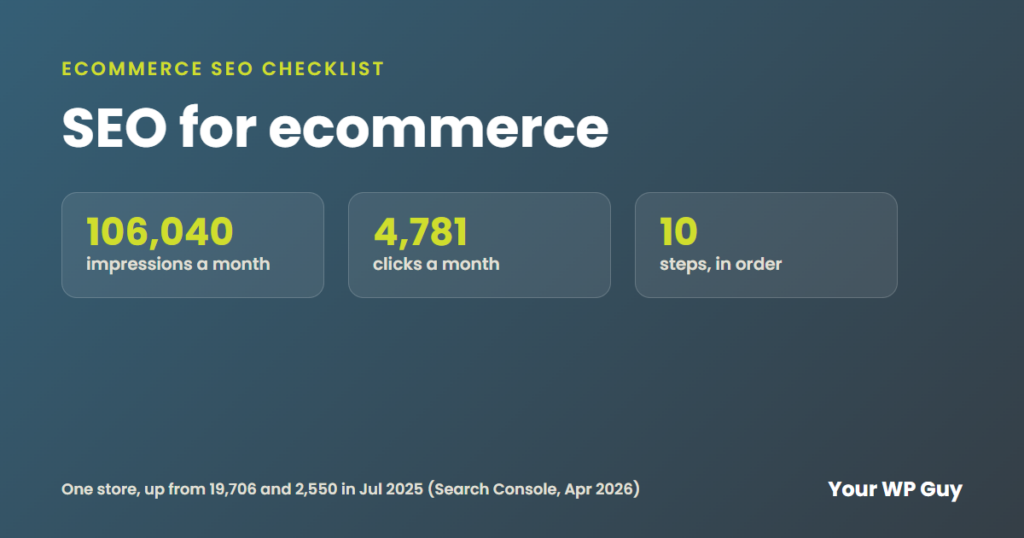
Yes, and it brings sales you do not pay for click by click. On one store we work with, Search Console showed impressions grow from 19,706 a month in July 2025 to 106,040 a month in April 2026. Clicks went from 2,550 to 4,781 a month over the same stretch.
It does take time, though. Ads can bring shoppers the same day, while SEO usually takes a few months to build. Many stores run both, and you can read more in what is PPC.
How do you find the right keywords for an online store?
Shoppers search in two ways, so you need two kinds of keywords:
- Category keywords are broad, like "leather recliners" or "dog harnesses." They belong on your category pages.
- Product keywords are specific, like "brown leather power recliner" or "no-pull dog harness for large dogs." They belong on product pages.
Longer, more specific searches are easier to rank for and usually closer to a sale. Start with the words your customers already use. Look in Google Search Console, your store's own search box and the questions people email you.
How should category pages be set up?
Category pages are often your best chance to rank, because they match the broad searches. Set them up like this:
- Add a short intro at the top that says what is in the category and who it is for.
- Link to every product. Google says that if category pages don't link to all their products, it "might not find all of your products by crawling alone."
- Use real links. Google asks for normal <a href> links, not buttons that only work with JavaScript.
- Give each page of results its own address, like /recliners/page/2/. Google says pagination is where it sees the most URL mistakes.
- Link best sellers from your homepage. Google uses links to judge which pages matter most.
What makes a product page rank?
- Write your own description. If you copy the maker's text, hundreds of other stores have the same words.
- Use real photos with alt text that says what the photo shows.
- Show reviews. They add fresh words and help shoppers decide.
- Give each color or size a URL Google can read. Google treats /product/t-shirt#black and /product/t-shirt#white as the same page. Use a separate URL or a ?color= setting instead of a # mark.
- Keep out-of-stock pages up if the item is coming back. If it is gone for good, redirect the page to the closest product or category, never to the homepage.
What is product schema?
Product schema is a small block of code that tells Google the price, stock and ratings of a product in a form it can read. Google says it is not required, but it makes your page eligible for richer results that show price, stock, ratings and shipping in Search, Images and Lens.
There are two types. Product snippets are for pages where people read about a product but can't buy it. Merchant listings are for pages where people can buy, and they can include shipping and return details.
Here is a simple example of what the code looks like:
<script type="application/ld+json">
{
  "@context": "https://schema.org",
  "@type": "Product",
  "name": "Brown Leather Power Recliner",
  "image": "https://example.com/recliner.jpg",
  "description": "Full-grain leather power recliner with USB charging.",
  "sku": "REC-204",
  "offers": {
    "@type": "Offer",
    "price": "1299.00",
    "priceCurrency": "USD",
    "availability": "https://schema.org/InStock"
  }
}
</script>
On WooCommerce, an SEO plugin like Rank Math or Yoast adds this for you. Run a product page through Google's Rich Results Test to make sure it shows up with no errors.
Should you use Google Merchant Center?
Yes, if you sell online. Merchant Center is where you send Google a list of your products, called a feed. Google says it is not required to show up in Search, but you need it to show in places like the Shopping tab. Listing products there can be free, and paid Shopping ads use the same feed.
Google also says that using both product schema and a Merchant Center feed gives you the best chance to show up. WooCommerce and Shopify both have free ways to connect a feed.
What about Bing?
Google is the biggest, but Bing still sends shoppers, and most of the setup is free. Here are the Bing pieces we set up for stores:
- Bing Webmaster Tools. This is Bing's version of Search Console. If your site is already in Search Console, you can import it in a few clicks, and your sitemaps come with it.
- Microsoft Merchant Center. This is where you send your product feed to Bing. Approved products show for free in the Bing Shopping tab, and Microsoft says clicks from that free section cost nothing. You can import the feed straight from Google Merchant Center, so you only build it once.
- IndexNow. This tells Bing the moment you add, change or remove a product, instead of waiting for it to crawl your site again. Search engines that use IndexNow share what you send with each other. Rank Math has it built in, so on WooCommerce it is often just a setting to turn on.
Bing reads the same product schema and the same category and product page setup, so the work you do for Google carries over.
Does site speed matter for ecommerce SEO?
It matters for sales even more than for rankings. A slow product page loses shoppers before they see the price, and big catalogs slow down fast. Jonathan learned that on the furniture store with over 65,000 products. For the numbers Google uses and how we test, read what makes a good web page.
What is a quick ecommerce SEO checklist?
- Connect Google Search Console and Bing Webmaster Tools and see which searches already bring people in.
- Pick one main keyword for each category page and each top product page.
- Write a short intro on every category page.
- Make sure each category links to all of its products with normal links.
- Rewrite the maker's text on your best sellers first.
- Add alt text to product photos.
- Check product schema in the Rich Results Test.
- Set up Google Merchant Center and Microsoft Merchant Center and send your product feed to both.
- Fix # links for colors and sizes, and give each page of results its own address.
- Test speed on your homepage, a category and a product page, on a phone.
Do the first five on your best sellers before anything else. A few strong pages beat a hundred half-done ones.
Want your store's SEO done for you?
You did not start a store to fix category links and schema. Our monthly WordPress SEO starts at $875 a week. Want to know what is holding your store back first? SEO Research starts at $2,999. Need sales sooner? We also run ecommerce PPC.
1. Talk to us about your store and goals. 2. We find what is holding your pages back. 3. You get more shoppers from search, without paying for every click.
Sources
- Google Search Central, Best practices for ecommerce sites in Google Search (checked November 2026)
- Google Search Central, Help Google understand your ecommerce site structure (checked November 2026)
- Google Search Central, Designing a URL structure for ecommerce sites (checked November 2026)
- Google Search Central, Share your product data with Google (checked November 2026)
- Google Search Central, Product structured data (checked November 2026)
- Bing Webmaster Blog, Import sites from Search Console to Bing Webmaster Tools (checked November 2026)
- Microsoft Advertising, About Product listings (checked November 2026)
- IndexNow, Documentation (checked November 2026)
What to do next
Open Search Console today and find your three best-selling products. Run the first five checklist steps on those pages, so your store can do its job as your hardest-working employee.
Keep reading: What is SEO? | What is PPC? | What makes a good web page?