
How to Create a Facebook Business Page (Step by Step, 2026)
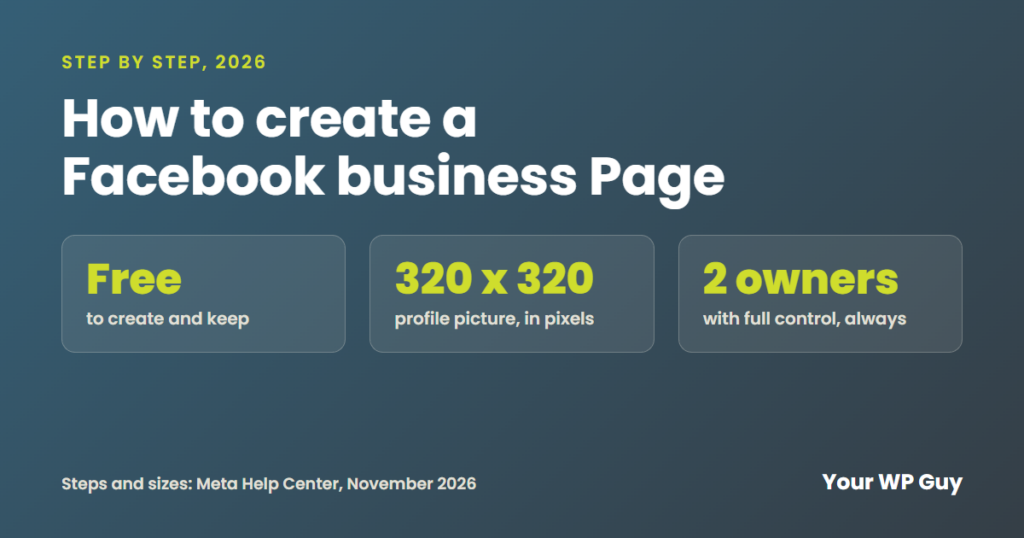
A Facebook business Page is free, and you can set one up in about 20 minutes. Log in to your own Facebook profile, click Pages > Create page > Public page, then add your business name, category and a short bio. Next, add your contact info, hours, photos and an action button. Before you invite anyone, give a second person from your business full control. If you would rather have someone run it for you, see our social media management.
You know your business needs a Facebook Page. You just don’t want to set it up wrong, or worse, lose it a year from now because the wrong person was in charge of it.
We set up and run Facebook Pages for small businesses, and we have helped owners get back into Pages they were locked out of. This guide walks you through every step on a computer and a phone. It also covers the photo sizes Meta uses now, what to set up before you go public and how to make sure your Page always stays yours.
What do you need before you start?
You need your own personal Facebook profile and about 20 minutes. Meta only lets a real person create and manage a Page, and the Page stays separate from your profile. Have these ready before you start:
| What | Why you need it |
|---|---|
| Your own Facebook profile | You create and manage the Page from it. Don’t make a fake profile for the business (see below). |
| Your business name | Use the same name as on your website and your Google profile. |
| A category | Pick the most exact one, like “Italian Restaurant”, not just “Restaurant”. |
| A short bio | One or two sentences on what you do and who you serve. |
| Your logo | 320 x 320 pixels, square. Facebook crops it to a circle. |
| A cover photo | 851 x 315 pixels works best. Sizes are in the table below. |
| Contact info | Phone, email, website, and your address or the area you serve. |
| Your hours | The same hours as on your Google profile. |
Some guides tell you to make a second Facebook profile just for your business. Don’t. Meta’s Terms say to “create only one account (your own)” and to never give anyone else access to it. A fake profile can be shut down, and any Page it runs can go with it.
How do you create a Facebook business Page on a computer?
Log in to Facebook and follow Meta’s 11 steps. The menu names below are the ones Meta uses in November 2026.
- Log in to Facebook, then click Pages on the left.
- Click Create page.
- Select Public page, then click Next.
- Click Get started.
- Add your Page name and category.
- Add a short bio (it is optional, but fill it in) and click Create Page.
- Add your contact info, location and hours, then click Next.
- Add your profile and cover photos, set up the action button and click Next.
- Connect WhatsApp, or click Skip.
- Skip inviting friends for now and click Next. You will invite them once the Page is ready.
- Choose your notification settings and click Done.
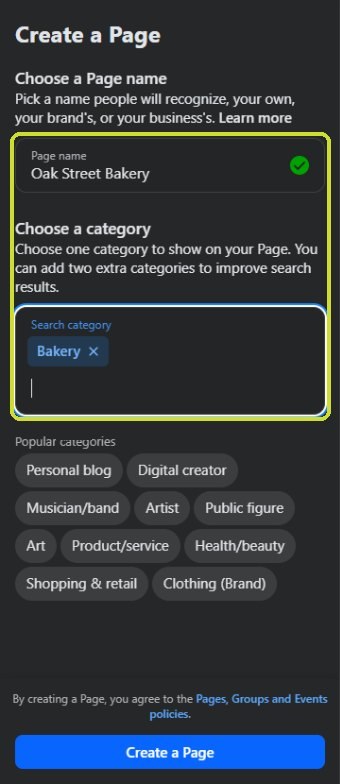
Facebook sometimes skips a step, like the Public page choice. If it does, just go on to the next one.
Your Page is now live, and anyone can find it. If it isn’t finished yet, hide it while you work on it (see below).
How do you create a Facebook business Page on your phone?
The steps are the same in the iPhone and Android Facebook apps.
- Open the Facebook app and tap Menu.
- Tap Pages.
- Tap Create at the top left.
- Choose Create a new Page, then tap Next.
- Add your Page name, then tap Next.
- Choose a category, then tap Create.
- Add your bio, contact info and location, then tap Next.
- Add your profile and cover photos, then tap Next.
- Skip inviting friends for now and tap Next.
- Choose your notification settings, tap Next, then tap Done.
A computer is easier for the photos and the details, but the phone works fine. You can always finish the rest later on a computer.
What photo sizes does a Facebook Page use?
Use a 320 x 320 pixel profile picture and an 851 x 315 pixel cover photo. These are the sizes on Meta’s help page in November 2026.
| Photo | Size to upload | How it shows |
|---|---|---|
| Profile picture | 320 x 320 pixels | 176 x 176 on computers, 196 x 196 on phones. Cropped to a circle. |
| Cover photo | 851 x 315 pixels, JPG, under 100 KB (at least 400 x 150) | Wider on computers (16:9), shorter on phones (2.4:1). |
| On phones | Keep the bottom edge of the cover clear | The profile picture covers about 40 pixels of the cover. |
Source: Meta Help Center, Facebook Page profile picture and cover photo sizes, checked November 2026. Older guides still list 180 x 180 or 196 x 196 for the profile picture and 1640 x 856 for the cover.
Keep words and your logo near the middle of the cover, since phones and computers crop it differently. If your logo or cover has text, Meta says a PNG file may look better than a JPG.
What should you set up before you invite anyone?
Finish the Page before people see it, because first visits count. Here is what to do first.
- Hide the Page while you work. A new Page is public right away. To hide it, switch into the Page and go to Settings > Access and control > Unpublish Page, then click Continue and Confirm. Your changes stay hidden until you publish it again from the same spot.
- Add a second owner. Give one more person from your business full control now, before anything else. The next section explains why.
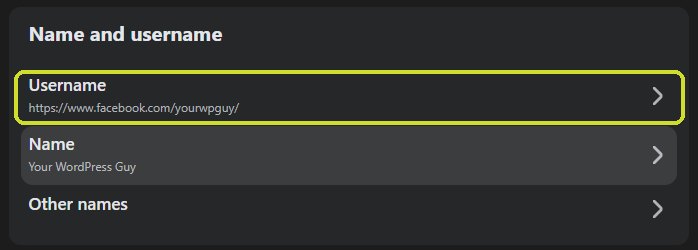
- Pick a username. This gives you a short web address like facebook.com/yourbusiness. Switch into the Page, click its profile picture, then go to Settings & privacy > Settings > Page setup > Name > Username. Meta says a brand new Page may not be able to pick one right away, so try again in a few days if it won’t let you. A username can also be removed if the Page isn’t used.
- Set your action button. Pick the one thing you want people to do: call, book, send a message or visit your website.
- Fill in your details. Add your services, your hours and a few lines about your story. Facebook lets you add 2 extra categories to help people find you, and you can change them any time under About > Category.
- Match your Google profile and website. Use the same business name, phone number, address and hours everywhere. When the details match, customers trust them, and so do Google and the AI tools that answer questions about your business.
Who should have control of your Facebook Page?
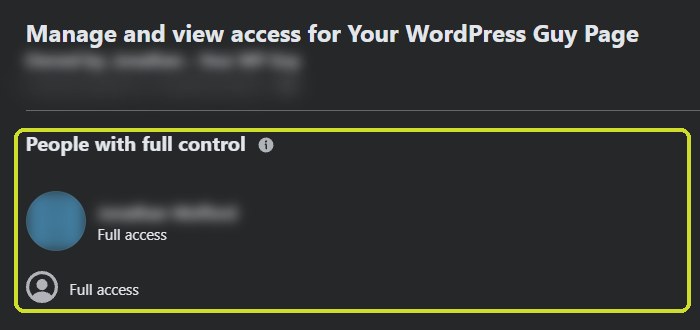
At least two people who own or run the business should have full control. Everyone else who helps should get less access. This is the step most owners skip, and it is the one that costs them their Page.
| Access type | What they can do | Give it to |
|---|---|---|
| Facebook access, full control | Everything, including adding or removing anyone (even you) and deleting the Page | You and one other owner or partner |
| Facebook access, partial control | Posts, messages, comments, ads and stats, but not settings or access | Staff, family members or an agency that posts for you |
| Task access | Chosen jobs, like ads or messages, from Meta Business Suite or Ads Manager only | Someone who only runs your ads or answers messages |
| Community Manager | Moderates live chats | Only if you go live |
Source: Meta Help Center, About Facebook Page access, checked November 2026.
Meta’s own help page is plain about the risk. If no one with full control is left, the Page is shut off and set to be deleted. And anyone with full control can remove you.
Three rules keep your Page safe:
- Never share your Facebook login. Give people their own access instead. It is safer, and Meta’s Terms require it.
- Remove people when they leave. Make it part of the day an employee or agency leaves, like taking back a key.
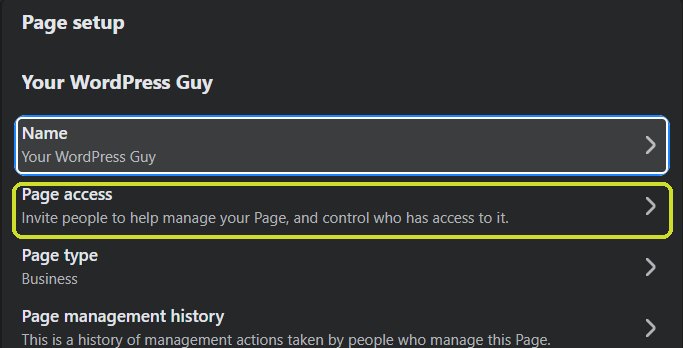
- Check who has access twice a year. Switch into the Page and go to Settings > Page setup > Page access. Make sure every name still belongs there.
Running your Page from an extra profile? Meta is deleting all additional Facebook profiles after December 14, 2026. If you set up a second profile in your account to run your Page, give your main profile full control of the Page before that date.
Want your Facebook Page set up and run for you?
You did not start your business to learn Facebook’s menus. Our social media team plans and makes your posts and keeps your Page active, so you can get back to running your business.
1. Tell us about your business and goals. 2. We set up or clean up your Page and plan your posts. 3. We post for you on a steady schedule.
What should you post first on your new Page?
Post 2 or 3 times before you invite anyone, so the Page doesn’t look empty. A good start is a short welcome post, a photo of your work or your team, and a post that answers a question customers ask you all the time.
Then publish the Page if you hid it, and invite friends from the Page. Add a link to your Page on your website, in your email signature and on your Google profile. After that, post on a steady schedule, even if it is once a week. A Page that stops posting looks closed.
Ads are optional and separate. A Page is free to keep, and you only pay Meta if you boost a post or run ads. If you want more reach than posts alone can get, see our Facebook ads management.
What happens when the wrong person controls your Page?
We have seen it more than once. A business owner comes to us after the only person with full control of their Page left the business, and now no one can get in.
In some cases, it was a former employee who had set the Page up. We had to track that person down and ask them to give the access back. Until they did, the owner was stuck waiting on someone who didn’t work for them anymore.
In other cases, the only person with access had passed away, and there was no way into the account. Meta says no one can log in to a memorialized profile. It also says a Page whose only admin had their profile memorialized is removed from Facebook once Meta gets a valid request. All the posts, reviews and followers go with it.
Both problems have the same fix, and it takes five minutes: give a second person from your business full control of the Page today. While you are at it, add a legacy contact to your own profile in your Facebook settings. A legacy contact is someone you choose to look after your profile if you pass away.
Facebook business Page FAQs
Is a Facebook business Page free?
Yes. Creating and running a Facebook Page is free. You only pay if you choose to boost posts or run ads, and that is always up to you.
Do I need a personal Facebook account to make a business Page?
Yes. Meta requires a personal profile to create or help manage a Page. The Page is still separate from your profile. When you switch into the Page, you post and reply as the business, not as yourself.
Can I make a business Page without a personal account?
No. Every Page is managed by real people with their own profiles. Making a fake profile just for the business breaks Meta’s Terms, which say to create only one account, your own, and it puts the Page at risk.
Can I turn my personal profile into a business Page?
Meta’s help pages don’t offer a way to turn a profile into a Page. Create a new Page instead. Meta does offer professional mode, but that is a setting for your personal profile, not a business Page.
Can I delete my personal profile and keep my Page?
Only if someone else has full control of the Page first. Meta says Pages that only you control are deleted when you delete your profile. If you only deactivate your profile, Pages that only you control are deactivated too.
How do I hide my Facebook Page until it is ready?
Unpublish it. Switch into the Page, go to Settings > Access and control, click Unpublish Page, then Continue and Confirm. You can keep making changes, and no one without access can see the Page until you publish it again.
Why can’t I create a username for my new Page?
Meta says newly created Pages may not be able to create a username right away. Wait a few days and try again. Also check that the name isn’t already taken and follows Meta’s username rules.
Sources
- Meta Help Center, Create a Facebook Page (computer, iPhone and Android steps; checked November 2026)
- Meta Help Center, Facebook Page profile picture and cover photo sizes (checked November 2026)
- Meta Help Center, About Facebook Page access (checked November 2026)
- Meta Help Center, Unpublish or republish a Page (checked November 2026)
- Meta Help Center, How to create a username for your Facebook Page (checked November 2026)
- Meta Help Center, Page categories (checked November 2026)
- Meta Business Help Center, Set up your Facebook business Page (checked November 2026)
- Meta Help Center, What happens to additional profiles (checked November 2026)
- Meta Help Center, Delete or deactivate your profile (checked November 2026)
- Meta Help Center, What happens to your Facebook profile if you pass away (checked November 2026)
- Meta Terms of Service (effective January 1, 2025; checked November 2026)
What to do next
A Facebook Page takes an afternoon to set up and a few minutes a week to keep alive. Set it up, hide it until it is ready, add a second owner, and then post on a steady schedule. If you would rather hand it off, we can help.
Talk to a marketing expert about your Facebook Page.